
HV BMS Manual :
 TOPBMS 5S-256S Manual -English Version .pdf
Phone APP of HV BMS 5S-256S :


After entering APP , please select "High Voltage " and "TOP BMS" ;
Note: Don 't change Board Add !!

PC Software of HV BMS 5S-256S :



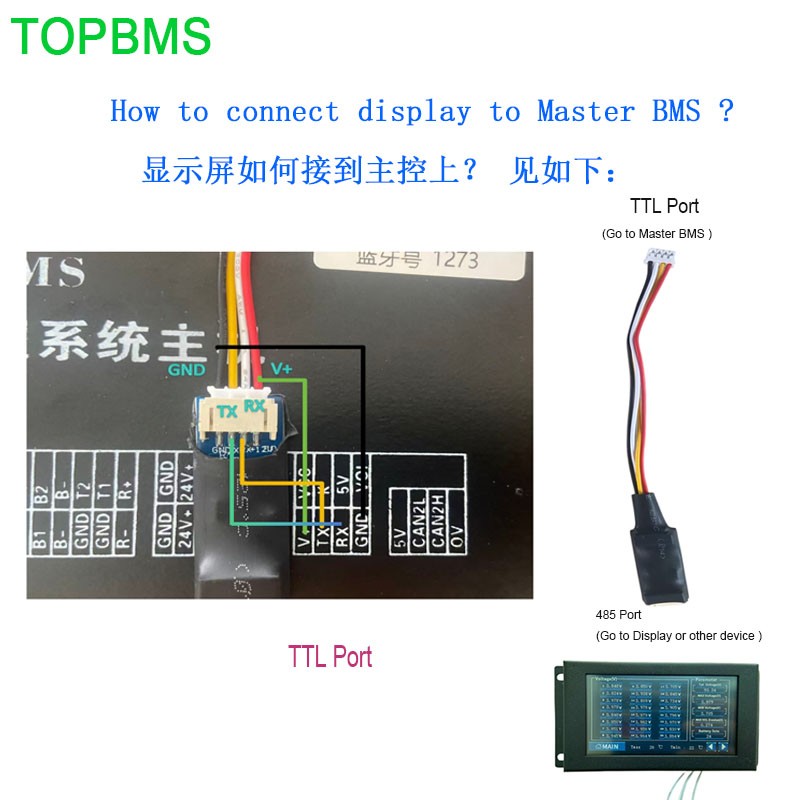


How to add new slave bms to current bms system ?
Step 1 : Please connect new slave bms to the last slave bms of current bms system via the 2 cables can -h and can- l ; something like below :

Step 2: Change the total battery strings
Change the total battery strings in the "battery Set" of PC software ; Please see below :

Change the total battery strings in the "Total Battery Num" of Phone APP ; Please see below :

Step 3: Change the total charging voltage
Change the total charging voltage at "总电压保护值” of phone app ;
Change the total charging voltage at "总电压保护恢复值” of phone app ;
Please see below :

Change the total charging voltage at "Voltage Protection” of PC software ;
Change the total charging voltage Recovery at "Voltage Recovery” of PC software;
Please see below :
